





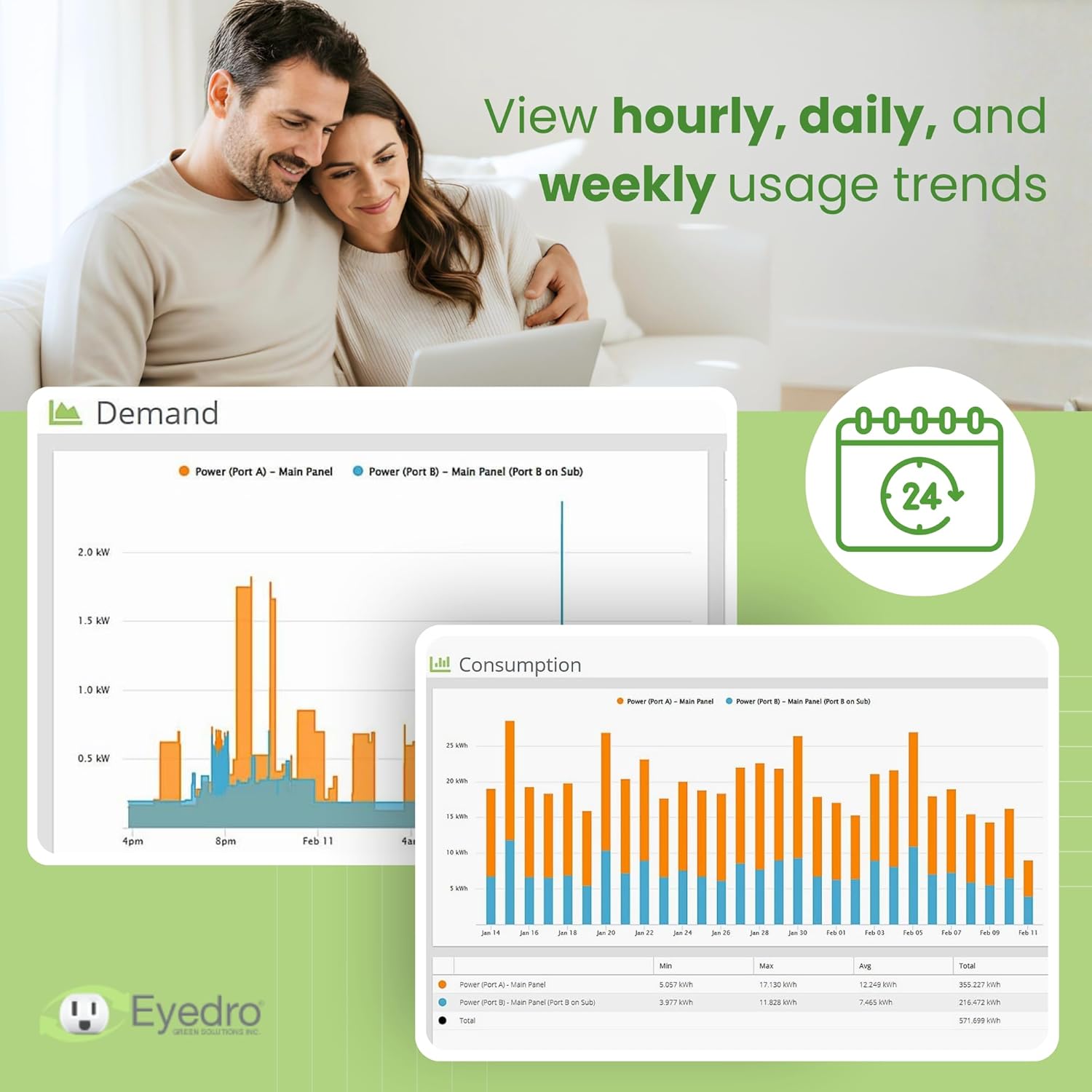
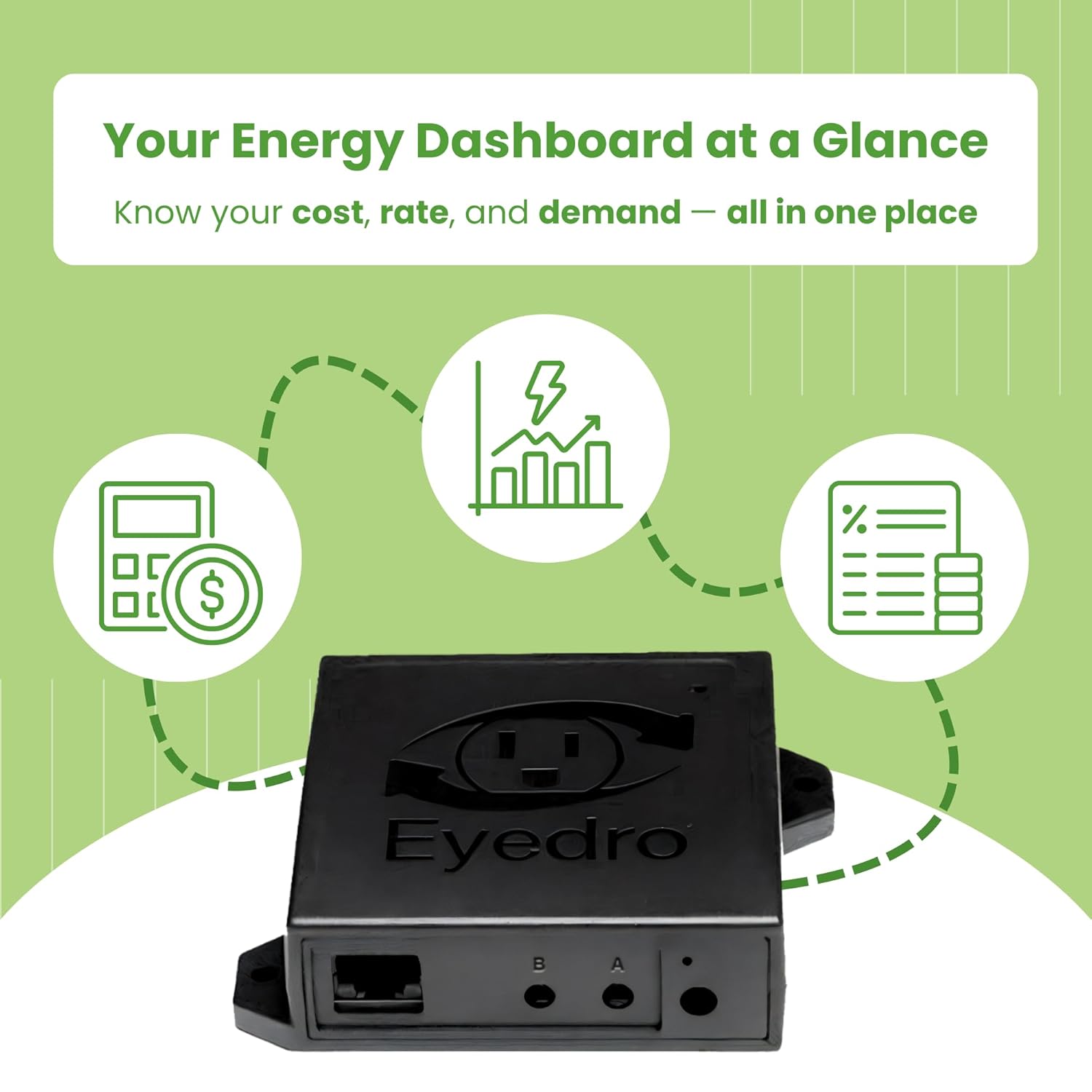
- Take Control of Your Power Use in Real Time: The Eyedro Home Energy Monitor gives you instant insight into how much electricity your home consumes and produces — empowering you to save money and optimize energy efficiency. Works as a whole home energy monitor or solar meter, giving clear, accurate data on your power usage 24/7.
- Track, React, Save – Identify energy waste, lower utility bills, and make smarter choices with real-time tracking through the MyEyedro cloud. Whether you’re living off-grid, managing a smart home, or just want to monitor costs, this smart energy monitoring system helps you visualize your consumption in dollars, watts, amps, and volts.
- Smart, Precise, and Easy to Use: Includes two 200A sensors, Ethernet cable, power adapter, and access to the MyEyedro cloud (no subscription). Compatible with WiFi or wired Ethernet, and supports solar, grid, or net metering. Track usage across devices, appliances, or circuits. Built to meet North American safety standards. Compatible with 2.4 GHz WiFi.
- Ideal for Homeowners, Smart Homes & Solar Users: Perfect for energy-conscious households, DIY enthusiasts, and off-grid living. The perfect electricity monitor to identify “energy hogs” and optimize your entire power system.
- Eyedro – Real Data, Real Savings: Trusted by homeowners and professionals for over a decade, Eyedro is dedicated to making energy monitoring simple and effective. Our mission: help you reduce waste, save money, and take control of your electricity with reliable, easy-to-use technology built to last.
- ***Note: a single EYEDRO-HOME can be used to monitor either grid energy or solar, or for net metering (not all at the same time). To break out the grid energy usage from the solar generation 2 x EYEDRO-HOME are needed (there is a Net Meter plugin in the MyEyedro software that requires 2 meters to activate). NEED HELP? Reach out to Eyedro’s Technical Support Team for assistance with the setup of your Eyedro device.
Back to products

Easy@Home Rechargeable TENS Unit + EMS Muscle Stimulator, Dual Independent Channels With 20 Intensity Levels, 8 EMS or TENS Massage Types + 16-Mode, Handheld Electronic Pulse...
Original price was: $414,667.90.$45.80Current price is: $45.80.
-5%







 Overview
| Manufacturer |
Eyedro |
|---|---|
| Place of Business |
Eyedro Green Solutions Inc. 606 Colby Drive ,Unit E Waterloo ,Ontario N2V 1A2 |
| Part Number |
EYEDRO-HOME |
| Product Dimensions |
20.32 x 20.32 x 7.62 cm ,700 g |
| Item model number |
EYEDRO-HOME |
| Is discontinued by manufacturer |
No |
| Style |
Ethernet/WiFi (EYEDRO-HOME) |
| Power Source |
AC |
| Item Package Quantity |
1 |
| Usage |
Indoor use |
| Included Components |
Energy module ,6VAC power adapter ,2 x 200A current sensors ,10 foot Ethernet cable ,Quick Start Guide |
| Batteries Included |
No |
| Batteries Required |
No |
| Item Weight |
700 g |
| Country of origin |
Canada |
| Date First Available |
Aug. 21 2022 |
 Processor
| Manufacturer |
Eyedro |
|---|---|
| Place of Business |
Eyedro Green Solutions Inc. 606 Colby Drive ,Unit E Waterloo ,Ontario N2V 1A2 |
| Part Number |
EYEDRO-HOME |
| Product Dimensions |
20.32 x 20.32 x 7.62 cm ,700 g |
| Item model number |
EYEDRO-HOME |
| Is discontinued by manufacturer |
No |
| Style |
Ethernet/WiFi (EYEDRO-HOME) |
| Power Source |
AC |
| Item Package Quantity |
1 |
| Usage |
Indoor use |
| Included Components |
Energy module ,6VAC power adapter ,2 x 200A current sensors ,10 foot Ethernet cable ,Quick Start Guide |
| Batteries Included |
No |
| Batteries Required |
No |
| Item Weight |
700 g |
| Country of origin |
Canada |
| Date First Available |
Aug. 21 2022 |
 Display
| Manufacturer |
Eyedro |
|---|---|
| Place of Business |
Eyedro Green Solutions Inc. 606 Colby Drive ,Unit E Waterloo ,Ontario N2V 1A2 |
| Part Number |
EYEDRO-HOME |
| Product Dimensions |
20.32 x 20.32 x 7.62 cm ,700 g |
| Item model number |
EYEDRO-HOME |
| Is discontinued by manufacturer |
No |
| Style |
Ethernet/WiFi (EYEDRO-HOME) |
| Power Source |
AC |
| Item Package Quantity |
1 |
| Usage |
Indoor use |
| Included Components |
Energy module ,6VAC power adapter ,2 x 200A current sensors ,10 foot Ethernet cable ,Quick Start Guide |
| Batteries Included |
No |
| Batteries Required |
No |
| Item Weight |
700 g |
| Country of origin |
Canada |
| Date First Available |
Aug. 21 2022 |
 RAM
RAM
| Manufacturer |
Eyedro |
|---|---|
| Place of Business |
Eyedro Green Solutions Inc. 606 Colby Drive ,Unit E Waterloo ,Ontario N2V 1A2 |
| Part Number |
EYEDRO-HOME |
| Product Dimensions |
20.32 x 20.32 x 7.62 cm ,700 g |
| Item model number |
EYEDRO-HOME |
| Is discontinued by manufacturer |
No |
| Style |
Ethernet/WiFi (EYEDRO-HOME) |
| Power Source |
AC |
| Item Package Quantity |
1 |
| Usage |
Indoor use |
| Included Components |
Energy module ,6VAC power adapter ,2 x 200A current sensors ,10 foot Ethernet cable ,Quick Start Guide |
| Batteries Included |
No |
| Batteries Required |
No |
| Item Weight |
700 g |
| Country of origin |
Canada |
| Date First Available |
Aug. 21 2022 |
 Storage
| Manufacturer |
Eyedro |
|---|---|
| Place of Business |
Eyedro Green Solutions Inc. 606 Colby Drive ,Unit E Waterloo ,Ontario N2V 1A2 |
| Part Number |
EYEDRO-HOME |
| Product Dimensions |
20.32 x 20.32 x 7.62 cm ,700 g |
| Item model number |
EYEDRO-HOME |
| Is discontinued by manufacturer |
No |
| Style |
Ethernet/WiFi (EYEDRO-HOME) |
| Power Source |
AC |
| Item Package Quantity |
1 |
| Usage |
Indoor use |
| Included Components |
Energy module ,6VAC power adapter ,2 x 200A current sensors ,10 foot Ethernet cable ,Quick Start Guide |
| Batteries Included |
No |
| Batteries Required |
No |
| Item Weight |
700 g |
| Country of origin |
Canada |
| Date First Available |
Aug. 21 2022 |
 Video Card
| Manufacturer |
Eyedro |
|---|---|
| Place of Business |
Eyedro Green Solutions Inc. 606 Colby Drive ,Unit E Waterloo ,Ontario N2V 1A2 |
| Part Number |
EYEDRO-HOME |
| Product Dimensions |
20.32 x 20.32 x 7.62 cm ,700 g |
| Item model number |
EYEDRO-HOME |
| Is discontinued by manufacturer |
No |
| Style |
Ethernet/WiFi (EYEDRO-HOME) |
| Power Source |
AC |
| Item Package Quantity |
1 |
| Usage |
Indoor use |
| Included Components |
Energy module ,6VAC power adapter ,2 x 200A current sensors ,10 foot Ethernet cable ,Quick Start Guide |
| Batteries Included |
No |
| Batteries Required |
No |
| Item Weight |
700 g |
| Country of origin |
Canada |
| Date First Available |
Aug. 21 2022 |
 Connectivity
| Manufacturer |
Eyedro |
|---|---|
| Place of Business |
Eyedro Green Solutions Inc. 606 Colby Drive ,Unit E Waterloo ,Ontario N2V 1A2 |
| Part Number |
EYEDRO-HOME |
| Product Dimensions |
20.32 x 20.32 x 7.62 cm ,700 g |
| Item model number |
EYEDRO-HOME |
| Is discontinued by manufacturer |
No |
| Style |
Ethernet/WiFi (EYEDRO-HOME) |
| Power Source |
AC |
| Item Package Quantity |
1 |
| Usage |
Indoor use |
| Included Components |
Energy module ,6VAC power adapter ,2 x 200A current sensors ,10 foot Ethernet cable ,Quick Start Guide |
| Batteries Included |
No |
| Batteries Required |
No |
| Item Weight |
700 g |
| Country of origin |
Canada |
| Date First Available |
Aug. 21 2022 |
 Features
| Manufacturer |
Eyedro |
|---|---|
| Place of Business |
Eyedro Green Solutions Inc. 606 Colby Drive ,Unit E Waterloo ,Ontario N2V 1A2 |
| Part Number |
EYEDRO-HOME |
| Product Dimensions |
20.32 x 20.32 x 7.62 cm ,700 g |
| Item model number |
EYEDRO-HOME |
| Is discontinued by manufacturer |
No |
| Style |
Ethernet/WiFi (EYEDRO-HOME) |
| Power Source |
AC |
| Item Package Quantity |
1 |
| Usage |
Indoor use |
| Included Components |
Energy module ,6VAC power adapter ,2 x 200A current sensors ,10 foot Ethernet cable ,Quick Start Guide |
| Batteries Included |
No |
| Batteries Required |
No |
| Item Weight |
700 g |
| Country of origin |
Canada |
| Date First Available |
Aug. 21 2022 |
 Battery
| Manufacturer |
Eyedro |
|---|---|
| Place of Business |
Eyedro Green Solutions Inc. 606 Colby Drive ,Unit E Waterloo ,Ontario N2V 1A2 |
| Part Number |
EYEDRO-HOME |
| Product Dimensions |
20.32 x 20.32 x 7.62 cm ,700 g |
| Item model number |
EYEDRO-HOME |
| Is discontinued by manufacturer |
No |
| Style |
Ethernet/WiFi (EYEDRO-HOME) |
| Power Source |
AC |
| Item Package Quantity |
1 |
| Usage |
Indoor use |
| Included Components |
Energy module ,6VAC power adapter ,2 x 200A current sensors ,10 foot Ethernet cable ,Quick Start Guide |
| Batteries Included |
No |
| Batteries Required |
No |
| Item Weight |
700 g |
| Country of origin |
Canada |
| Date First Available |
Aug. 21 2022 |
 General
| Manufacturer |
Eyedro |
|---|---|
| Place of Business |
Eyedro Green Solutions Inc. 606 Colby Drive ,Unit E Waterloo ,Ontario N2V 1A2 |
| Part Number |
EYEDRO-HOME |
| Product Dimensions |
20.32 x 20.32 x 7.62 cm ,700 g |
| Item model number |
EYEDRO-HOME |
| Is discontinued by manufacturer |
No |
| Style |
Ethernet/WiFi (EYEDRO-HOME) |
| Power Source |
AC |
| Item Package Quantity |
1 |
| Usage |
Indoor use |
| Included Components |
Energy module ,6VAC power adapter ,2 x 200A current sensors ,10 foot Ethernet cable ,Quick Start Guide |
| Batteries Included |
No |
| Batteries Required |
No |
| Item Weight |
700 g |
| Country of origin |
Canada |
| Date First Available |
Aug. 21 2022 |
Related Products

Queen Size 4 Piece Sheet Set – Comfy Breathable & Cooling Sheets – Hotel Luxury Bed Sheets for Women & Men – Deep Pockets, Easy-Fit, Extra Soft & Wrinkle Free Sheets – White…
In stock
Original price was: $56.20.$25.90Current price is: $25.90.
Compare
SKU:
A34A57FE
| Fabric Type |
Microfiber |
|---|---|
| Care Instructions |
Machine Wash |
| Number of Pieces |
4 |
| Batteries Required |
No |
| Included components |
Fitted Sheet ,Flat Sheet ,Pillowcase |
| Date First Available |
Jan. 23 2017 |
| Manufacturer |
CGK Unlimited |
| Place of Business |
CGK Unlimited ,600 Cleveland Street Suite #323 Clearwater ,FL 33755 |
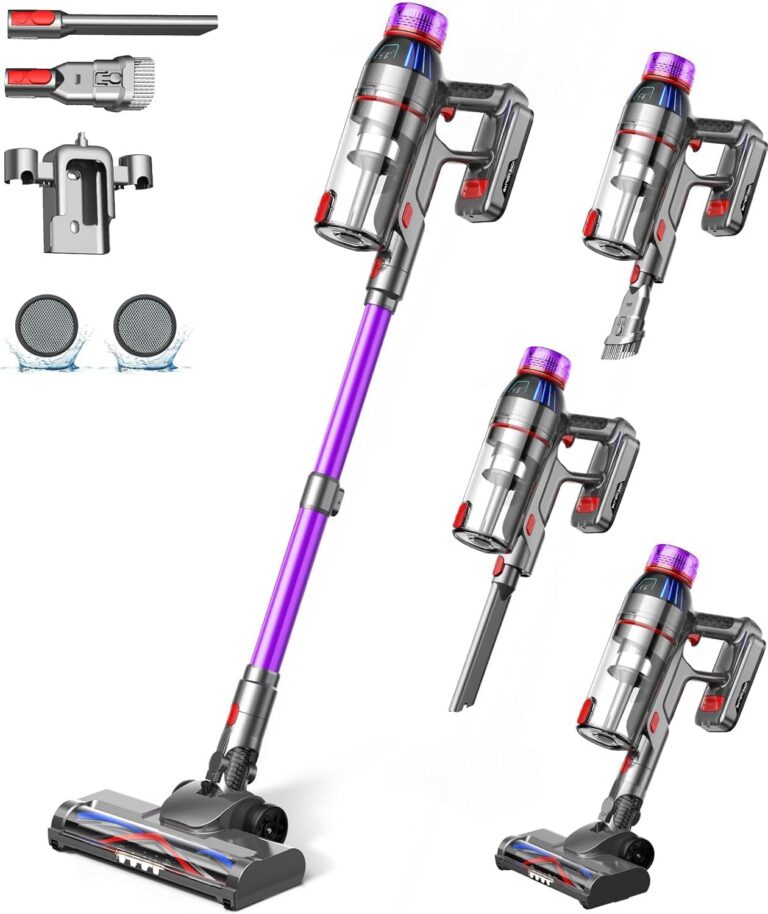
Cordless Stick Vacuum Cleaner: 550W Powerful Suction, LED Display, 55 Min Runtime, Anti-Tangle Brush, Rechargeable Battery, Lightweight for Home, Pet Hair, Hard Floors, Carpet
In stock
Original price was: $432.50.$111.40Current price is: $111.40.
Compare
SKU:
53BD544E
| Brand |
MQDXE |
|---|---|
| Model Number |
TV106S |
| Colour |
Purple |
| Parcel Dimensions |
43.2 x 24.4 x 19.2 cm ,3.29 kg |
| Power/Wattage |
550 watts |
| Voltage |
22.2 Volts |
| Material |
AA |
| Number of Speeds |
3 |
| Runtime |
55 minutes |
| Special Features |
Anti-Tangle Brush ,Cordless Stick Vacuum Cleaner for Home Pet Hair Hard Floors Carpet ,LED Flex Head LED Display ,Rechargeable Battery ,Ultra-Powerful Suction Up to 55 Mins Runtime |
| Item Weight |
3.29 kg |
| Date First Available |
Sept. 11 2024 |
| Manufacturer |
MQDXE |
| Place of Business |
MQDXE |

Utopia Bedding Waterproof Mattress Protector Queen Size, Viscose Made from Bamboo Mattress Cover 200 GSM, Fits 17 Inches Deep, Breathable, Fitted Style with Stretchable Pockets
In stock
Original price was: $27.70.$25.50Current price is: $25.50.
Compare
SKU:
3F93188F
| Brand |
Utopia Bedding |
|---|---|
| Model Number |
FBA_UB0014 |
| Colour |
White |
| Product Dimensions |
203.2 x 152.4 x 43.18 cm ,1.04 kg |
| Material |
80% Polyester ,20% Viscose Derived from Bamboo |
| Special Features |
Fitted Style ,Washable ,Wateproof |
| Item Weight |
1.04 kg |
| Date First Available |
July 20 2016 |
| Manufacturer |
Utopia Bedding |
| Place of Business |
2385 Meadowpine Blvd 1 ,Mississauga |
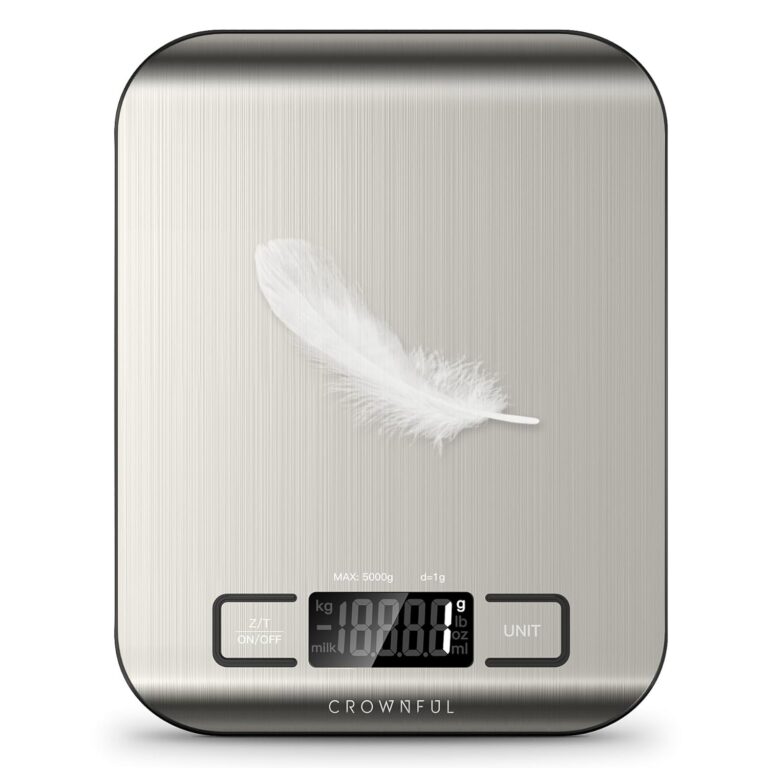
CROWNFUL Food Scale, 11lb Digital Kitchen Scales Weight Ounces and Grams for Cooking and Baking, 6 Units with Tare Function (Battery Included)
In stock
Original price was: $19.00.$15.60Current price is: $15.60.
Compare
SKU:
775EA946
| Manufacturer |
CROWNFUL |
|---|---|
| Place of Business |
Anaheim ,CA 92804 ,US |
| Part number |
SYDZC1 |
| Item Weight |
230 g |
| Product Dimensions |
1.5 x 18 x 14 cm ,230 g |
| Batteries |
1 CR2032 batteries required. |
| Item model number |
CF-KS01 |
| Colour |
Sliver |
| Material |
Stainless Steel |
| Power source type |
Battery |
| Voltage |
3 Volts |
| Item Package Quantity |
1 |
| Maximum Weight Capacity |
5 Kilograms |
| Display Style |
LCD |
| Special Features |
Backlit Display |
| Batteries Included |
No |
| Batteries Required |
Yes |
| Battery Cell Type |
Alkaline |
| Length |
1.5 Centimetres |
| Width |
18 Centimetres |
| Height |
14 Centimetres |
| Date First Available |
Sept. 22 2020 |

LEVOIT Humidifiers for Bedroom, 2.5L Top Fill Cool Mist Air Humidifier for Baby Nursery, Plants, Ultrasonic, Auto Shut-off, BPA Free, Quiet, Knob Control, 360° Nozzle
In stock
$43.20
Compare
SKU:
DBF729DA
| Item Weight |
2.16 Pounds |
|---|---|
| Care Instructions |
Hand Wash |
| Assembly Required |
No |
| Number of Pieces |
1 |
| Type of Guarantee |
2 year |
| Batteries Required |
No |
| Included components |
1 x 2.5L Top-Fill Cool Mist Humidifier Classic 160 ,Cleaning Brush ,User Manual ,Water Filter Sponge |
| Date First Available |
Aug. 15 2023 |
| Manufacturer |
LEVOIT |
| Place of Business |
ANAHEIM ,CA ,92806 US |

Utopia Bedding Queen Sheet Set – 4 Piece Queen Bed Sheets Set – Soft Brushed Microfiber Fabric – Shrinkage & Fade Resistant – Easy Care (Grey)
In stock
Original price was: $30.30.$19.00Current price is: $19.00.
Compare
SKU:
CC8B720D
| Fabric Type |
100% Polyester Microfiber |
|---|---|
| Tick-Repellent Material |
100% Polyester |
| Finish Types |
Soft |
| Care Instructions |
Machine wash ,tumble dry or iron low heat ,Do not bleach |
| Number of Pieces |
4 |
| Batteries Required |
No |
| Included components |
Fitted Sheet ,Flat Sheet ,Pillowcase |
| Date First Available |
Sept. 24 2015 |
| Manufacturer |
Utopia Bedding |
| Place of Business |
2407 Meadowpine Blvd 1 ,Mississauga ,ON L5N 6C3 ,Canada |
Mike S. –
It works very well. It’s nice to see the actual consumption with my solar setup. It is great for troubleshooting problems. I noticed immediately when my septic pump failed. You really notice power hog devices and try and conserve where you can. Great device. Would definitely recommend.
Alex –
TLDR: It’s a decent home/small-business solution. Gives a much better overview of energy consumption vs what KW Hydro has on their website.
Good:
– The version I have (2 measurement coils, wired internet connection) is affordable (<150$ on Amazon).
– Easy to set up.Power consumption samples up to every 10 seconds.
– Almost real-time (~5-10 seconds delay).
– Handles correctly power and/or internet loss.
– The web interface is reasonably easy to use and share with other people.Has enough advanced settings to be able to automatically estimate electricity bills and time-of-usage/tiered consumption.
– The platform can be extended with add-on metering devices.
Bad:
– Requires an internet connection and the my.eyedro.com cloud to see any stats or download data.
– Does not accurately account for voltage drop (since it does not have volt-meter) and power factor (mine is ~90%). So it will show a slightly higher load/consumption than what really occurred. You’ll need to adjust this manually, so it’s not a “set and forget” kind of setup.
– Might not immediately sense subtle changes in load (10w or less), especially when in “change of state” polling mode.
– To measure individual circuits (eg. solar net-metering, baseboard heating) one would need a much more expensive version of the device (that has extra measurement coils and ports) or to buy another meter just like this one (for each pair of circuits).
Brigo –
I purchased this a week ago, and installed it literally in a few minutes. I did not even look at the directions, it’s just too simple.
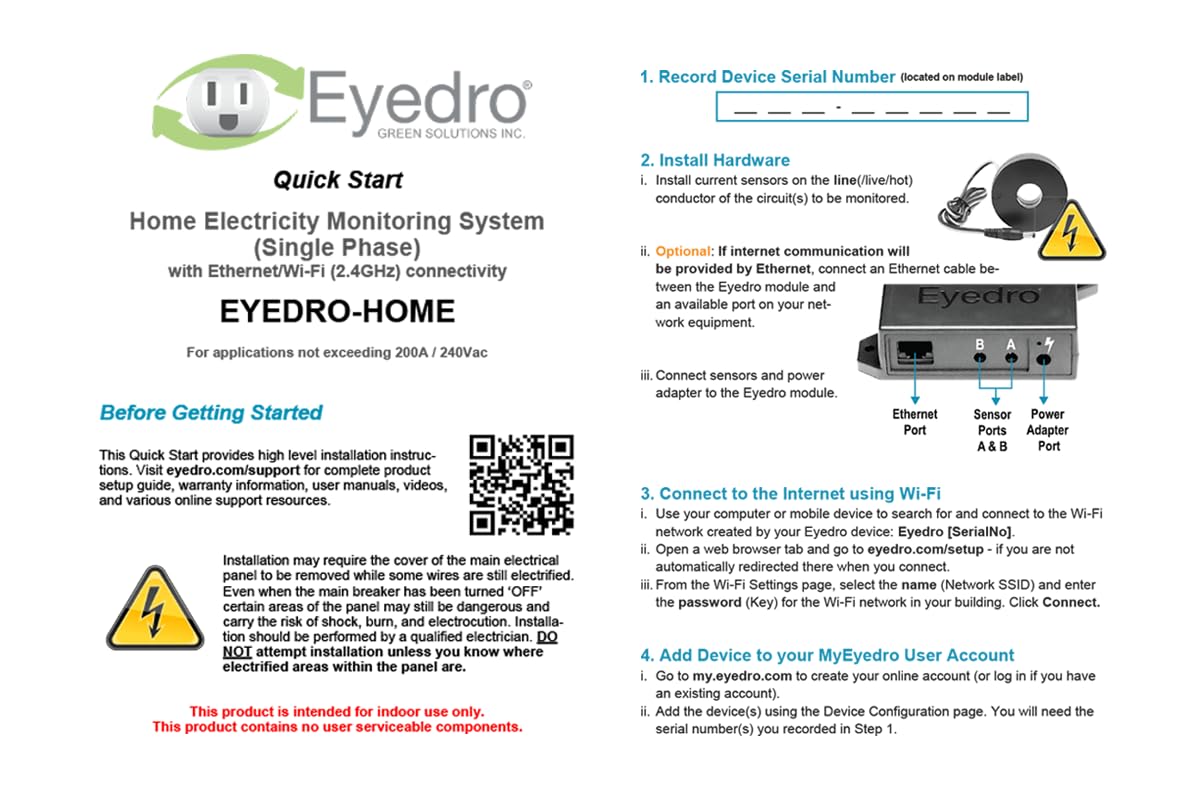
The install is really easy if you’re at all handy and not afraid of your load panel. Simply put, you remove the cover from your load panel, open the sensor by pushing in the little clip, slide the sensor around one of the power mains, and clip it shut. Repeat for the other sensor. Drop the wires out of the panel and replace the cover. Then connect the sensors to the EyeDro box, run an ethernet cable to it, and plug in the power. Voila!
Next, go to their website and register an account, and either enter the serial number from the box or click the “Scan network” option which will find it.
That’s it, you’re up and running!
The box itself is very small, about the size of a deck of cards. There are no indicator lights on it, but it does include screws and a mounting template if you want to wall mount it.
If you have not decided yet, you can go to their website and play with a demo version of the system, which is nice.
It has the following reports:
* Highlights. This shows a bar chart with recent power usage per hour, a meter that shows current usage (and is very responsive), today’s total usage, today’s projected total usage, a comparison to last month, the minimum and maximum amount of power used, the current rate (if you entered it into the setup, such as a tiered rate like I have), your estimated bill to date, and an estimate for your total bill.
The best part about the Highlights is that the meter is VERY RESPONSIVE. I can watch the needle move up and down in near real-time. I can see when the stove is turned on, then watch as it cycles the burner on/off to maintain heat. It also shows a +/- designation that shows how much more/less power is being used presently compared to the last time the needle moved. For example, right now it shows -25w after a fan was turned off. If something else turns on, it would show +[number] to indicate the difference.
* Insights. This shows your usage compared to other forms of power, such as gas, coal, natural gas, etc. I don’t find this very useful.
* Live. This shows a very detailed chart of minute-by-minute power usage.
* Summary. This shows a bar chart with hourly totals of power usage.
* Comparison. This shows a comparison of power used to the previous month on a daily basis.
* Bills. This shows a 12 month billing history, daily cost, daily average cost, consumption per tier, and so forth.
* Reports. This shows a weekly report of usage compared to previous weeks.
* Phantom energy. This shows your minimum usage demand, and helps you track down low-use devices that cost you money while they are supposedly turned off.
* What’s it cost. This is a usage calculator that allows you to pick from a wide range of devices to determine how much they cost you to operate.
* Net meter. If you have solar, or some other supplemental power supply system, this will tell you how much power you have generated versus how much you have used.
The mobile website has all of these features as well, and has a really well done “swipe” design that allows you to swipe left/right across multiple screens per area.
The site also has a variety of setup options, including a “rates” feature. This allows you to enter your rates from the power company, in one of three ways:
* Fixed Price
* Tiered
* Time of Use
You can also specify if you are billed:
* Monthly
* Bi-monthly
* Quarterly
Finally, you can also tell it that you have the following fees/charges:
* Fixed fees
* Variable (per kWh) fees
* Adjustment factor
* Taxes
* Rebates
My only complaints: You have to login to the website almost every time you visit, even if it’s only been an hour or two. On the mobile site this often results in a box saying “error” and it never goes away, so you cannot login. You have to close the tab/browser, or restart your phone to get back in. (I have reported this issue to them as of 5/10/2015 so hopefully they will fix this.) It’s just a little hassle to have to login each time. (SEE PHOTOS)
In addition, the “Dial” meter is inconsistent. Some times it has the needle in the red zone for (example) 4 kWh, and then later it will have the 4 kWh in the yellow zone. It’s not labelled either, and it should be. (SEE PHOTOS)
All in all I really like it. This is exactly what I have been looking for, it’s cheap, easy to use, and has really helped me understand what the energy hogs in my house are (hint: it’s my HVAC).
Finally, I got mine as an Amazon Warehouse Deal, for only $75! The box was very beat up, but the device was perfect and works great. Save yourself a few bucks if you can!
James F –
Bastante bueno he logrado identificar los aparatos que gastan más luz, identificando los gastos excesivos he logrado bajar 40% el consumo
El precio se me hizo caro… pero ahora que se que es lo que gasta más luz he podido ahorrarla y ahí se pagará el costo de este equipo
Me gustaría poder medir cada pastilla de luz pero solo hay esta versión que solo lee la principal
Robert N. –
I’ve been using this item for about 10 months now (actually I order 2 and use one for my home and the other for my parents house). I have never had an issue with the quality of the product. The website app can be used easily on a mobile device as well as a laptop. Easy to install and setup (they also have setup videos online you can watch). I use it multiple times a day to check my current demand (especially to check the demand of my hot tub and car charger). The daily consumption feature, month reports are convenient to use for knowing your energy consumption and what to expect from an invoice for your electrical utility (the myEyedro reports have always been withing a few dollars of the utilities invoice). I have contacted their technical support team and they are quick to respond and help you out. I would highly recommend this product for the all the features you get for the price; it can’t be beat!
fiveseven808 –
Initially bought a two port WiFi monitor and installed in on sub panel mains in the pump house on the farm we’re converting to off-grid wind/solar. It was fast and easy setup, worked the first time, and the reporting web app at my.eyedro.com is very easy to use, and will aggregate output from multiple devices into various user definable views. I subsequently ordered an additional 4 port Eyedro to monitor the two other power feeds, one to the main house, and the other to shop / outbuildings.
The Eyedro monitors do provide the ability to query them on the local network and get result readings directly without using the Eyedro.com web app in the form of raw data, so it is possible to use them to capture data to custom monitoring application software.
Very impressed by the product. I would like to know more about where the data is going, who has access to it, and where it’s hosted. I’m not particularly comfortable with a 3rd party gathering intimate details about power utilization of all of its customers without knowing how that data is used.
Tholius –
I’ve had this unit installed, a little less than 48 hours so far and I can already tell that this is an amazingly well designed product that I will enjoy using for years to come!!!
Device Installation:
I only have 50A service to my house (it’s an old house). I bought 60A CTs. 200A CTs it comes with are pretty huge. The 60A CTs are itty bitty and EASILY fit into my house’s ancient cutoff switch! Installation was a breeze. CT wires are super super long too so it aids in the ease of installation!
Device Setup:
Super easy. Connect and web into the eyedro device, add your wifi details, and done!
Web account:
Make an account and then enter serial number printed on the device on the website, and done!
You can even reverse the CT direction on the site in case you installed one backwards (like I did!) BRILLIANT! Why that reversal feature isn’t in all of these devices boggles my mind…
API:
RESTful API. Simple, easy, effective. Wanna know the best part? YOU CAN QUERY THE DEVICE ITSELF! If for some reason Eyedro goes out of business, you aren’t left with a useless piece of electronic that tries to phone home and stops working when it can’t see the Eyedro servers. You can either use a third party application or write your own (like I did) to query the device and display the relevant info where you need it! (like on my MagicMirror screen)
Web interface:
This interface is gorgeous. I come from efergy which is absolute trash. Eyedro gives you all the data you need, and even splits up your CTs on a beautiful, fast updating graph. It is difficult for me to overstate how much I love the interface on this website. It’s relatively clean, TONS of information, and they’re all in relatively intuitive areas. Let’s face it.. if you’re interested in installing whole house power monitoring, you’re probably a nerd. This web interface gives you the numbers and stats you want to mega nerd out.
Conclusion:
Want an easy to use API for your own devices (my main use case)? BUY IT
Want to customize the CTs you stick inside your electrical boxes for more accuracy and space limitations? BUY IT
Want a clean and beautiful web interface with TONS of numbers? BUY IT
Want to use this device well after the company Eyedro has died? BUY IT
dOn’t cARe AbOuT pOwEr mONItoRiNG? Why are you reading this review???
Amazon Customer –
This gives me the ability to monitor the power consumption of my new heat pump so I can see how much the electricity is costing me to cool and heat my home. It was not hard to install, although there are some gaps in the specific details of the setup. I have some knowledge of electrical so I could figure it out. The instructions for the configuration were not entirely clear. (Probably made sense to the engineer that wrote them…) and I am not clear whether I should be able to look at historical data for the current month. I can pull a report for previous months, but if I want to see last week I don’t seem to be able to do that. But with those things aside I love the information it gives me so I’m not even going to downgrade my rating from 5 stars. ⭐️ ⭐️⭐️⭐️⭐️
Mike S. –
Let me just start with how poor the instructions are on this product (see attached image). It basically says “connect it” and that’s it. No information about how it would be configured in a solar system, no information on the best place to connect it in your panel other than “put it on what you want to monitor”. I was trying to use it in an off-grid system, all of our power comes from our solar generation (which is stored in batteries). This seemed like a perfect product, given how much solar monitoring is mentioned, for example:
– “The EYFEFI-2 is capable of monitoring solar and electricity”
– “MONITOR YOUR SOLAR USAGE with the EYEFI-2 and its Two 200A Sensors.”
– “Check your solar usage to minimize electricity usage and maximize solar use.”
– “The EYEFI-2 supports Solar and Net Metering.”
This really sounds like it will monitor solar generation eh? Well, after connecting it at various places along our system and a fair amount of back and forth with customer service, it turns out that this is ONLY able to measure AC AFTER the inverter. It does not monitor how much your solar generates. The only situation in which it “monitors solar” is if you’re feeding your panels directly into an inverter and then dumping that directly back into the grid. In this scenario you’re technically only using solar to offset your grid usage and your home really just runs off grid with solar as a way to offset costs. This is no difference than if you’re using ANY AC monitor and there is NOTHING about this that is specifically designed for solar. It cannot monitor what your panels are collecting. It cannot monitor what your charge controller is outputting. It cannot monitor flow into your battery bank.
What it can do is monitor AC current (from grid or from an inverter) and you can LABEL that as “generation” on their website. So misleading and I’d argue is actively deceptive. Lastly, the website is janky as heck and barely works on a phone. The only thing it does to well is monitor usage from your main AC breaker panel. But so does a dozen other AC monitors on the market.
If you’re looking to “monitor solar generation” this product probably isn’t for you. If you’re looking to monitor how much your solar is pumping back into the grid, then this would work in that and only that scenario. Ultimately I returned the product and will probably build a raspberry pi system to monitor the output from my AXS Port on my charge controller.
Jferrer –
Obscure and hard to use web based app. No mobile app. Web based phone browser experience different than desktop. Easy to install and get working but so many questions and almost zero documentation. The user guide has such gems as “Pressing the menu button displays the menu.” It doesn’t get much better than that.
update 8/18/23:
Finally have the device set up correctly. Took a few calls to support to get it to work right, they had to configure something. I am set up with just one current sensor on the solar side, and then one on each leg of the consumption side. Then I have configured “use” which is the consumption sides, and “solar” which is the output of the solar array. Once this is set up, you can create automations in SmartThings such as then .
So basically I have a load controller I can program, as long as your thermostat(s) are supported by smartthings you can write your own load controller. It has been working flawlessly to keep my demand charge lower than 1.5 and letting my AC run while the sun shines during peak hours.
Great little device. It does complain that it has “gone offline” frequently, although it seems to only be for a minute or two, and they claim it must be a wifi issue even though my router is about 3 feet from the device which is NOT mounted inside the metal breaker panel (it is in a plastic utility box next to the panel.)